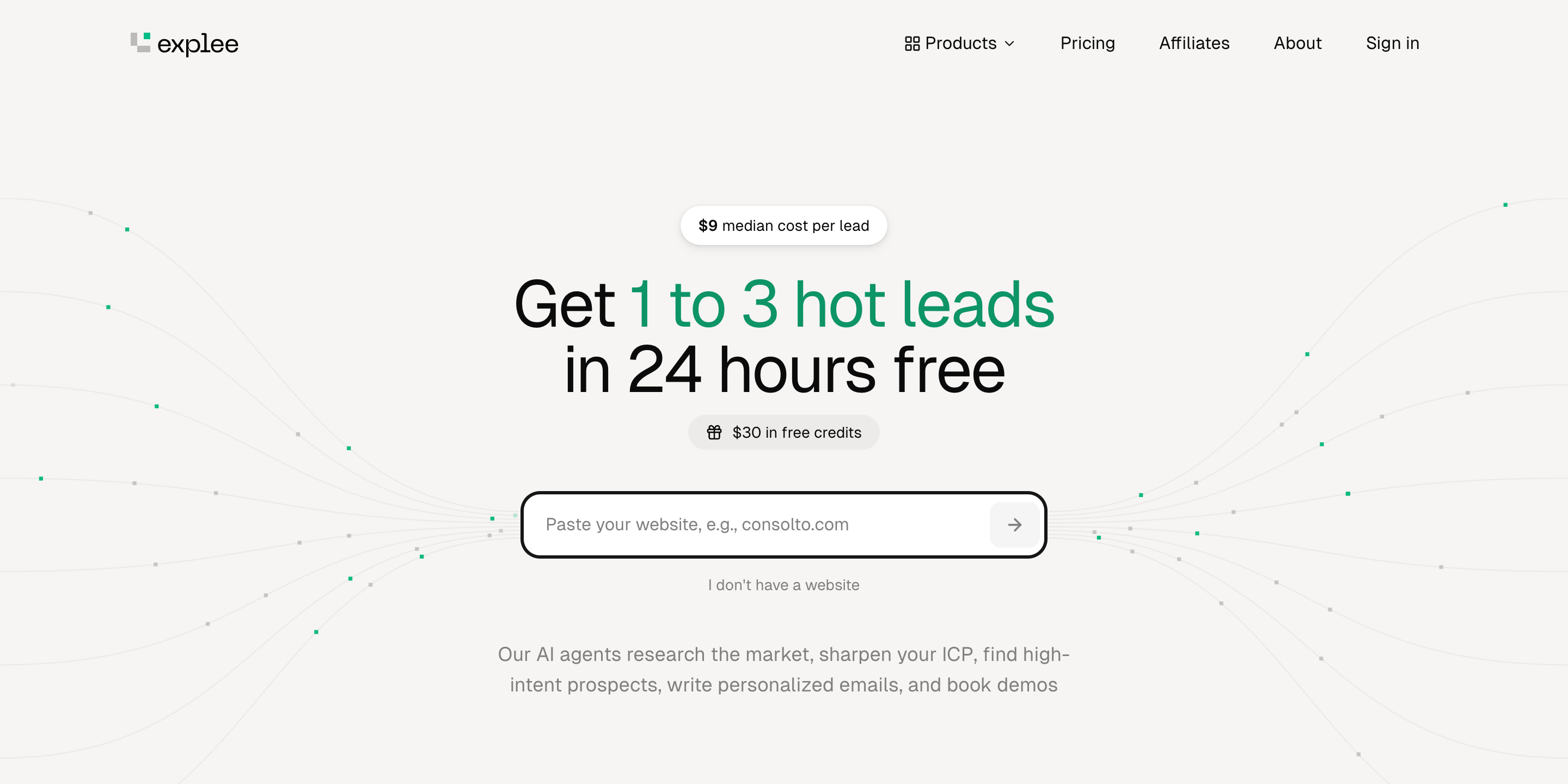

You built the product. Now you need customers, and you have no sales team. Cold email is the obvious channel, but setting it up is a project of its own: buy domains, configure DNS, warm up inboxes for weeks, find a lead list, write sequences, answer replies. Most founders give up before the first email goes out.
Explee skips the setup. You paste your website, and an AI agent works out what you sell and who buys it, picks companies and decision makers from its own database of 105M+ companies, writes each person a personal email, sends it from mailboxes Explee has already warmed up, answers the replies and sends your booking link. You pay $0.04 per email sent, and the first $30 is free.
Explee is made by Explee LTD in London. It used to be called AutoGTM; old accounts and links still work.
Features
What happens when you paste your website
The fastest way to judge Explee is its free demo: paste a URL on the homepage and the agent runs 6 steps in front of you. No signup, no card. We ran it on cal.com, a scheduling tool that sells to businesses. It took about 70 seconds to get to the email draft.
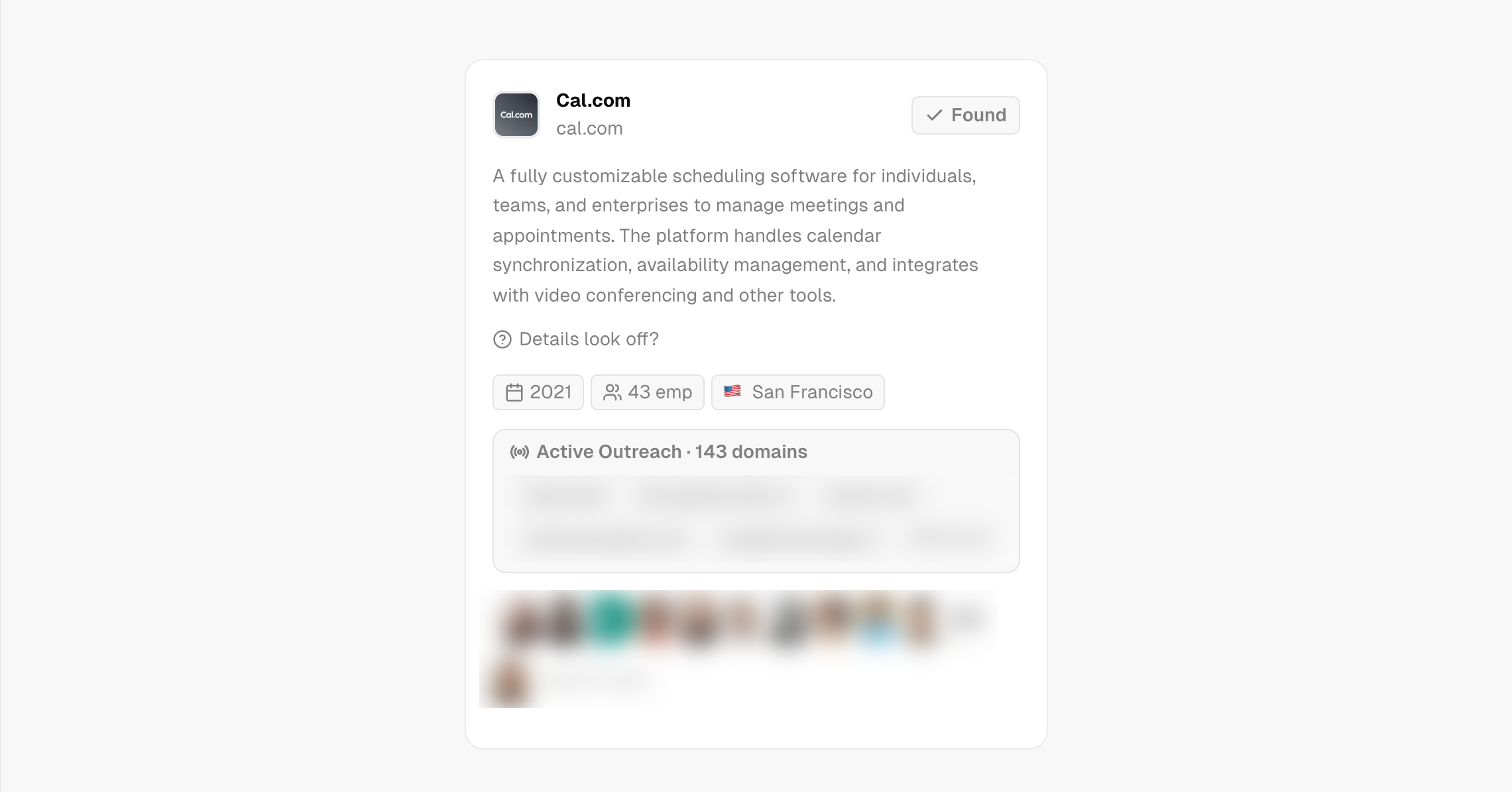
1. Research your company
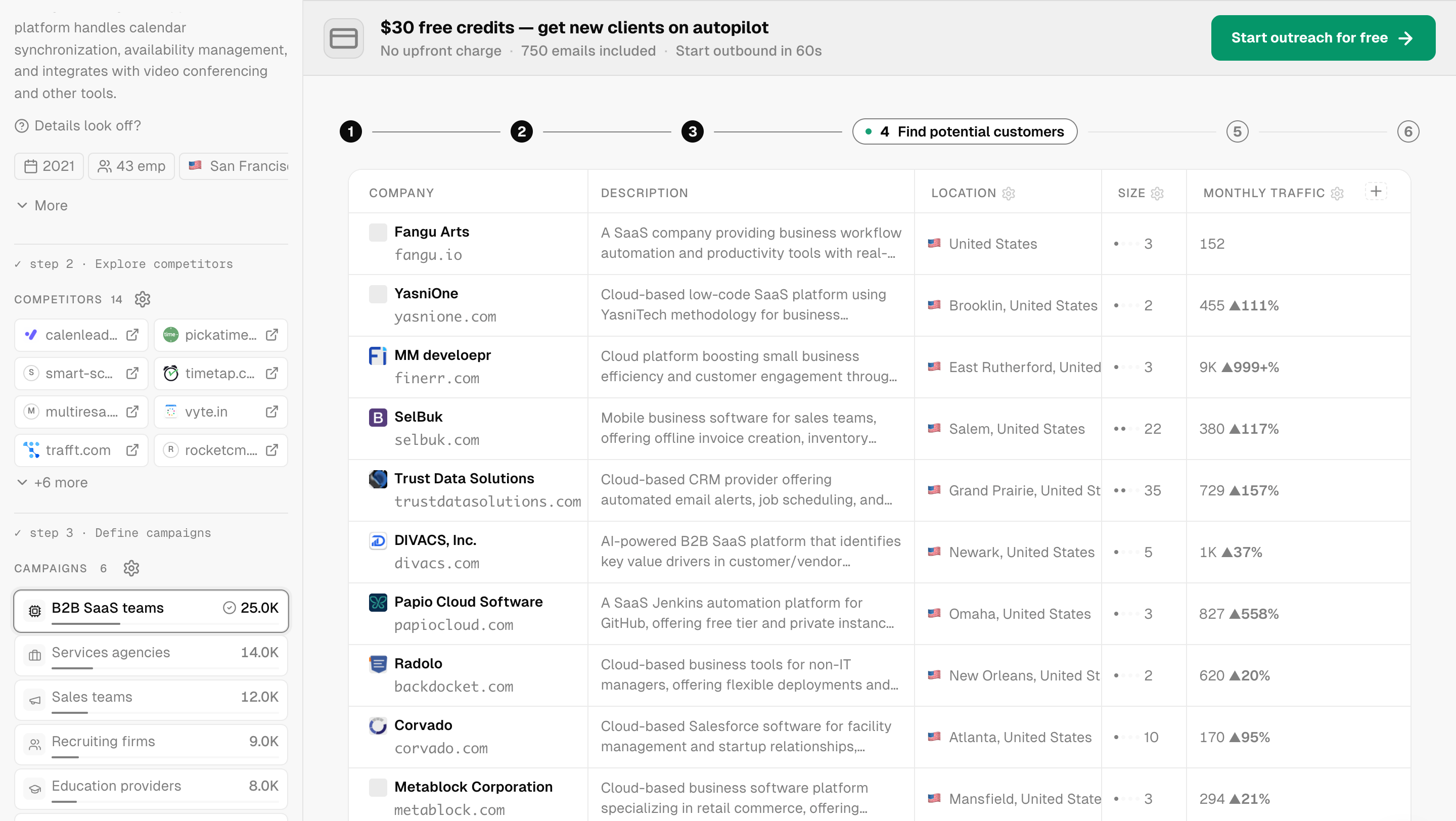
The agent reads the site and returns a company card: a one-paragraph description, founding year, headcount, location and the team it found. For Cal.com it got all of it right: "scheduling software for individuals, teams, and enterprises", founded 2021, 43 employees, San Francisco.
If the summary is wrong, click Details look off? and correct it. Check this step carefully: everything after it is built on this card. When we tried paralect.com, the agent described one of our open-source products instead of the company.
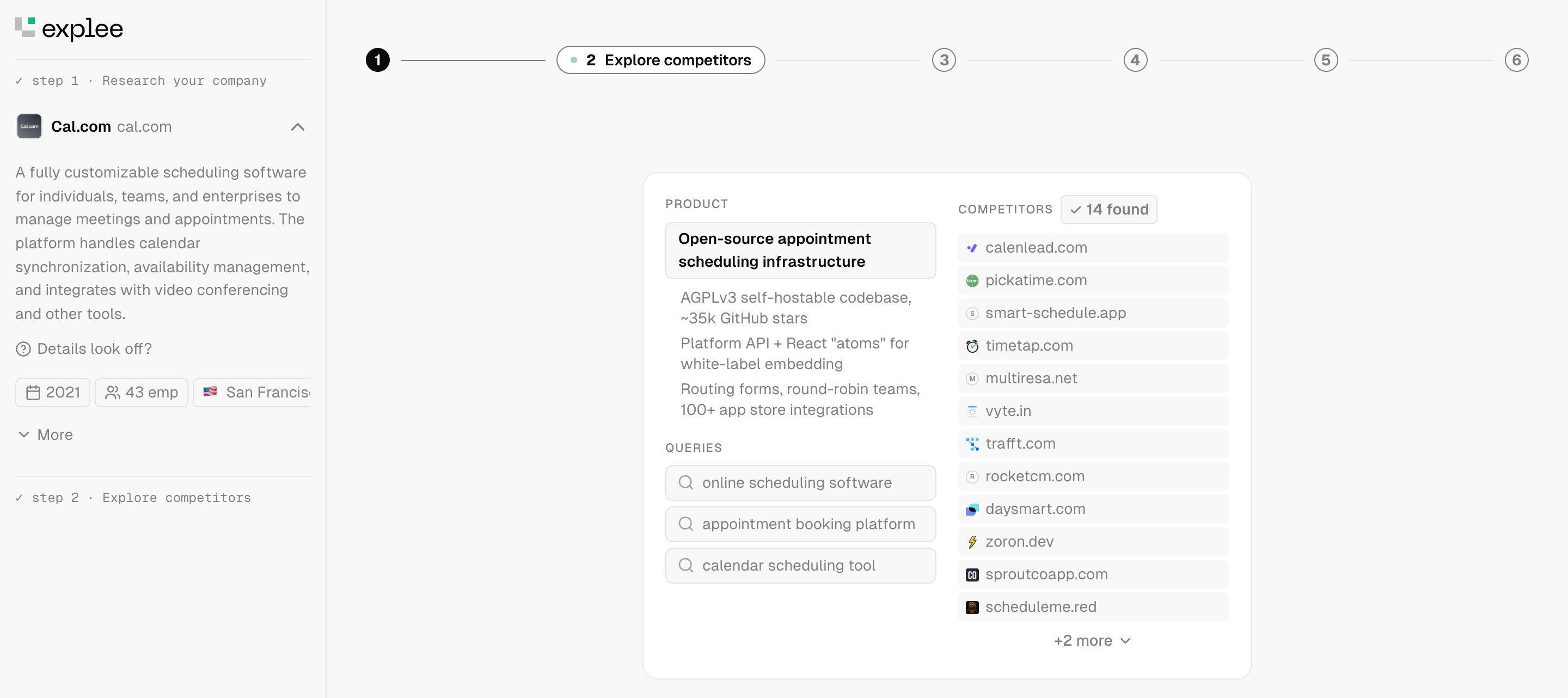
2. Explore competitors
Next, the agent states what your product is in one line, lists what sets it apart and runs search queries a buyer would type. For Cal.com it wrote "Open-source appointment scheduling infrastructure", pointed out the AGPLv3 self-hostable code and the 100+ app integrations, and found 14 competitors. You can edit the list with the gear icon.
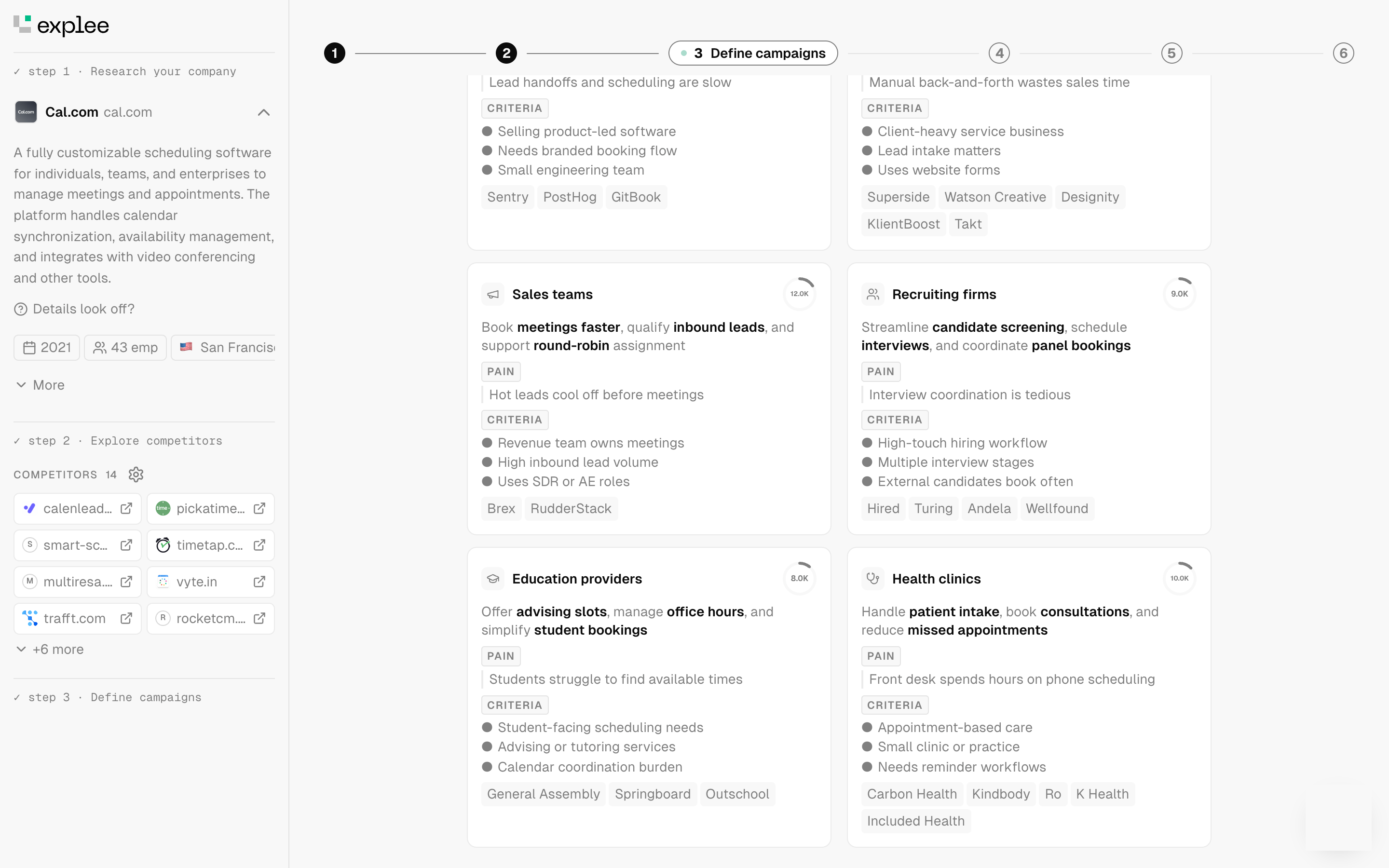
3. Define campaigns
This is the most useful screen in the product, even if you never send an email. The agent splits your market into campaigns. Each one has a pain, 3 buying criteria, example companies and an estimated number of companies that fit.
For Cal.com it proposed 6: B2B SaaS teams (25.0K), Services agencies (14.0K), Sales teams (12.0K), Health clinics (10.0K), Recruiting firms (9.0K) and Education providers (8.0K). The Sales teams card reads "Hot leads cool off before meetings", with criteria like "High inbound lead volume" and "Uses SDR or AE roles". That's a reasonable first draft of an ICP document.
4. Find potential customers
The agent queries its company index for the selected campaign and scores each domain for fit. You get a table with the company, an AI-written description, location, headcount and monthly traffic with its trend.
For the "B2B SaaS teams" campaign, most of the first rows were small US software companies with 2 to 35 people and a few hundred to a few thousand visits a month. Those are real buyers for a scheduling tool, but if you sell to larger companies, adjust the size settings (the gear next to Size) before you start sending.
5. Find decision makers
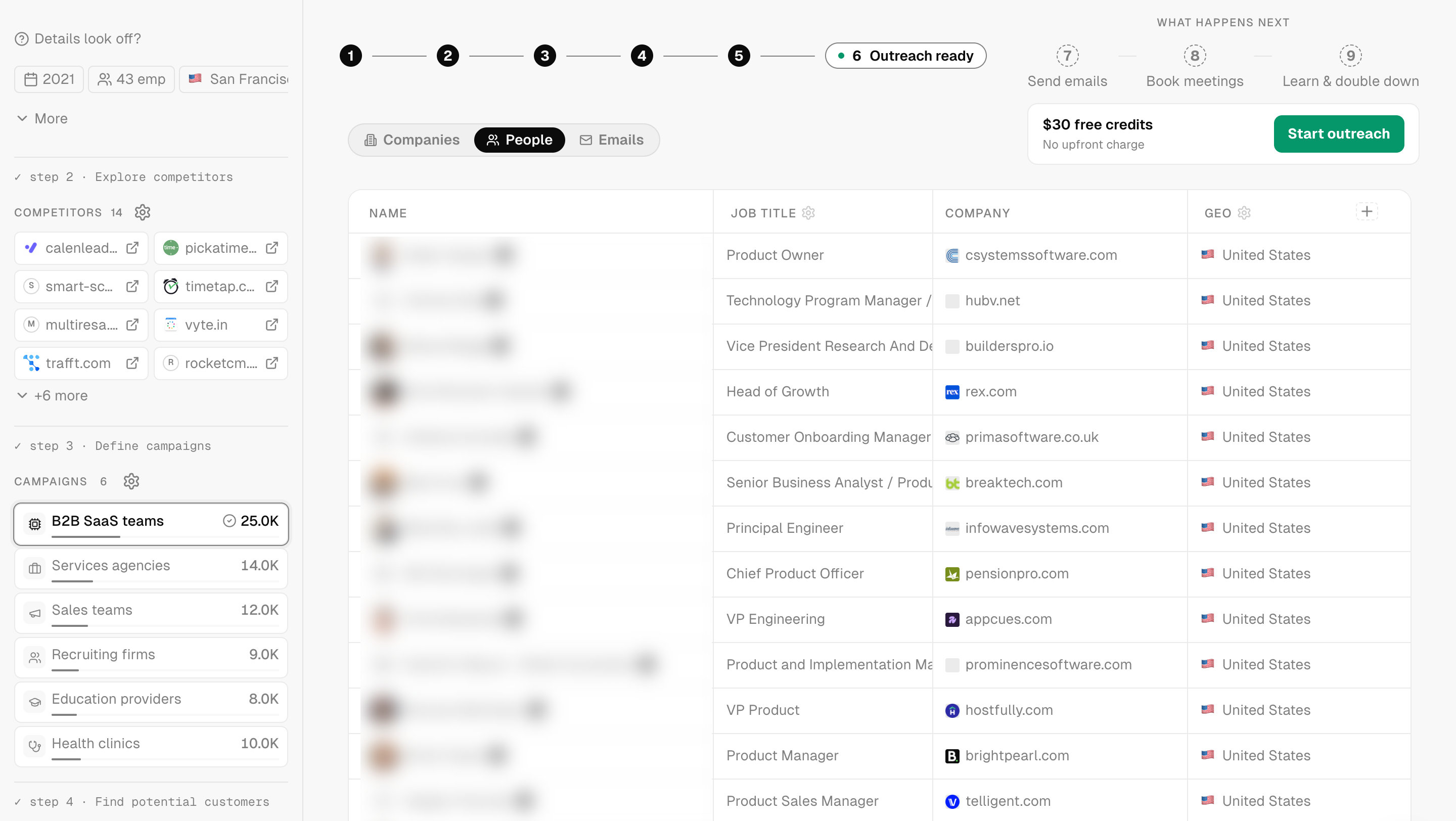
For each company, the agent picks people by role and pulls their name, job title, company and country. For Cal.com these were product and engineering leaders: Product Owner, VP Engineering, Chief Product Officer, Head of Growth. The job title filter has its own settings if you'd rather reach operations or sales.
6. Write emails
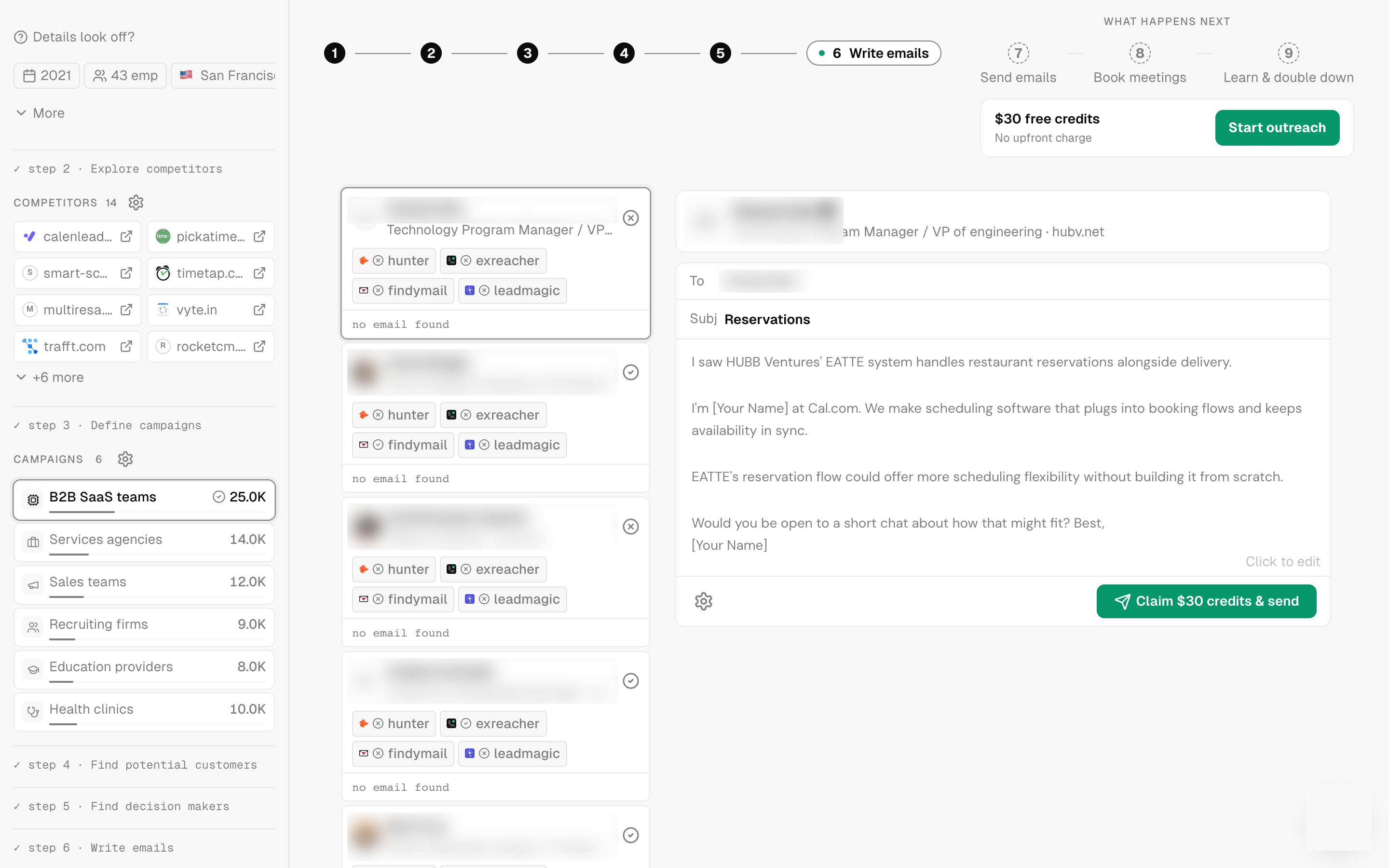
Last, the agent picks the hottest lead, reads their company and drafts the first email. Each lead card shows which email finders it tried (Hunter, Findymail, LeadMagic and others) and whether an address was found. In the demo, many contacts ended with "no email found". The FAQ says the agent only emails addresses that pass its checks, so expect fewer sendable contacts than people in the list.
Here is the draft it wrote to a VP of engineering at a restaurant software company:
Subject: Reservations
I saw HUBB Ventures' EATTE system handles restaurant reservations alongside delivery.
I'm \[Your Name\] at Cal.com. We make scheduling software that plugs into booking flows and keeps availability in sync.
EATTE's reservation flow could offer more scheduling flexibility without building it from scratch.
Would you be open to a short chat about how that might fit? Best, \[Your Name\]
It's short, it opens with something specific about the prospect, and it ends with a small ask. The subject line is weak and the middle paragraph is generic. You can click the draft to edit it before sending.
After the demo: send, book, learn
The next 3 steps start once you sign up: Send emails, Book meetings and Learn & double down. The agent sends within the daily budget you set, follows up, answers replies and sends your booking link when a lead asks for a call. It tracks cost per lead for each campaign, keeps spending on the ones that work and pauses the rest.
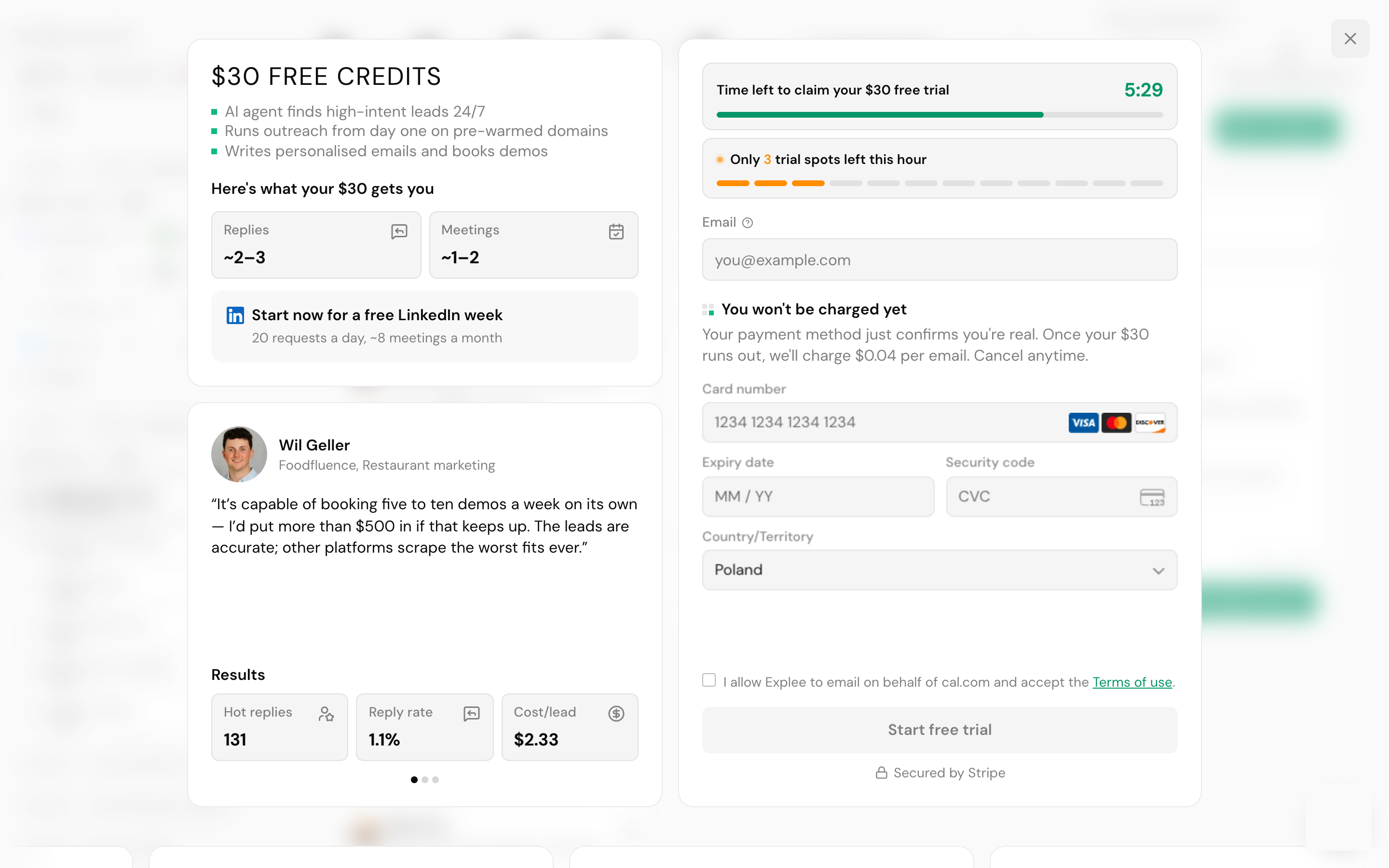
To start, click Start outreach. The signup screen asks for an email and a card (through Stripe) and a checkbox that lets Explee email on behalf of your domain. It also shows a countdown and a "trial spots left this hour" counter. Don't let it rush you: the $30 offer is on the homepage and the pricing page too.
How sending works
- Mailboxes. Emails go out from Explee's pre-warmed mailboxes, not from your company domain, so your own domain's reputation isn't at risk. Every mailbox has SPF, DKIM and DMARC set up. Explee pauses any mailbox that gets blocklisted or has too many bounces, and claims a 97% inbox rate.
- Leads. Picked from Explee's database by industry, role, company size and location. Only addresses that pass verification get an email. Already have a list? Upload a CSV after signup and the agent emails every contact that passes the same checks.
- Targeting. Any country or state, and a city when Explee knows where the company is.
- Language. The agent writes in each lead's language when it supports it, or in 1 of 30 languages you choose.
- What counts as a result. Explee calls a "hot lead" any reply that moves the deal forward, like "Send me pricing" or "Talk to my CTO", even without a booked call.
Pricing
There's no subscription for the outreach agent. Finding leads is free; you pay per email sent.
| What | Price |
|---|---|
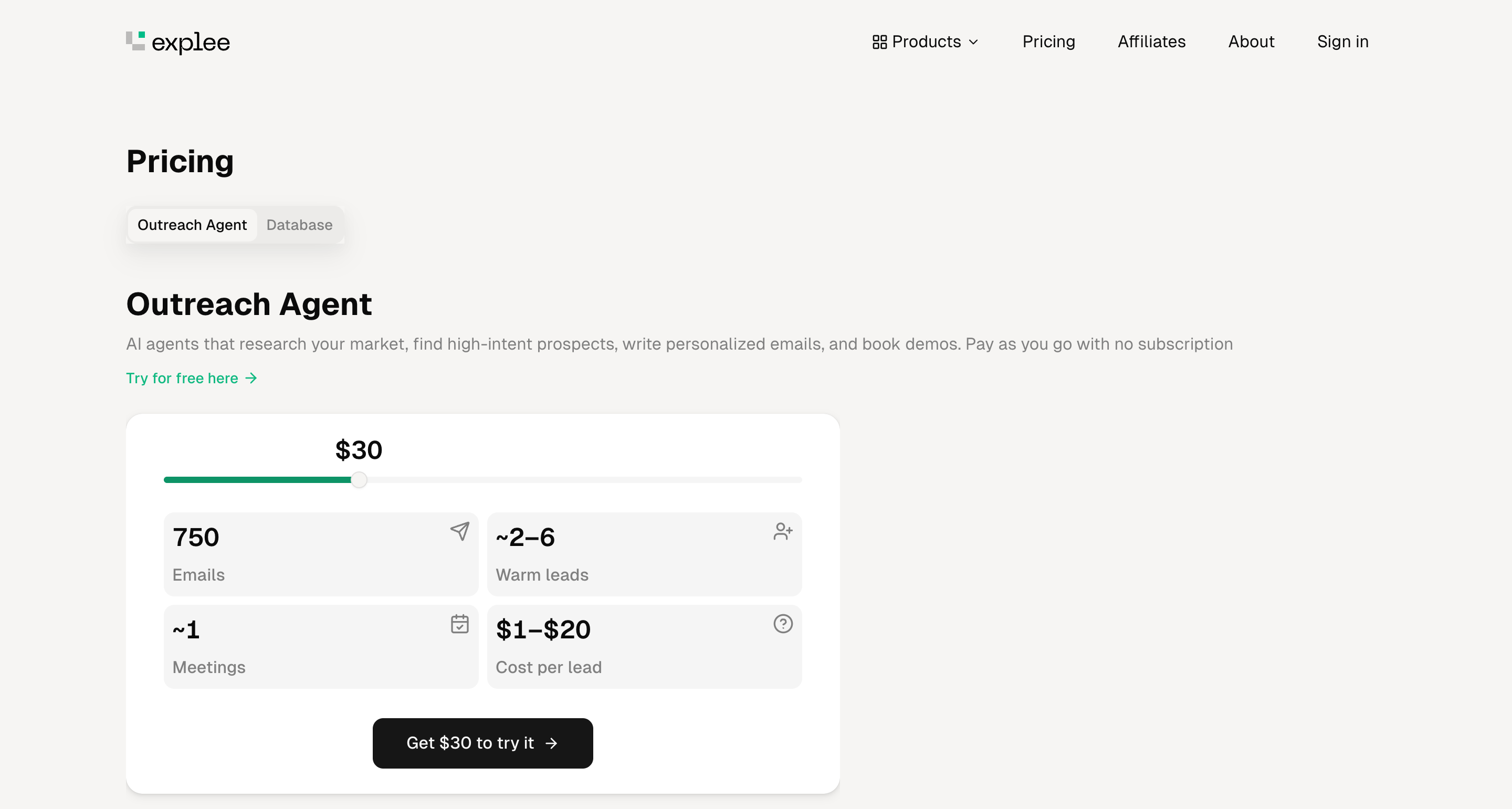
| Free credits on signup | $30 (about 750 emails) |
| Each email sent | about $0.04 |
| Billing | Charged for emails already sent, usually in batches of $5 or more |
| Spend control | Daily budget you can change at any time |
| Card check | Temporary $1 hold, released on its own |
What Explee says $30 gets you:
| Emails | Warm leads | Meetings | Cost per lead |
|---|---|---|---|
| 750 | about 2 to 6 | about 1 | $1 to $20 |
Across all customers, the homepage shows a median cost of $9 per hot lead (196,006 hot leads for 17,126 companies at the time of writing). Customer results on the site range from $1.71 to $6.67 per lead, with reply rates around 1.1% to 1.7%.
Explee also bills for a few things it doesn't price publicly: a monthly fee for dedicated mailboxes and domains, LinkedIn seats (the signup screen offers a free LinkedIn week at 20 requests a day), data plan subscriptions and credit packs. Ask support before you rely on those.
Other Explee tools
The data behind the agent is sold separately, as files or through an API.
| Product | What's in it | Price |
|---|---|---|
| 105M+ companies in 238 countries, 93 fields, refreshed every 4 weeks. Built from 310M websites, 74M LinkedIn company profiles, 210M Google Maps places and 100M+ registry records | Semantic search and custom AI fields free; deep research from $5 per 1,000 companies; emails from $10 per 1,000 | |
| US and EU company files | US: 22M+ companies, 20M+ decision makers. EU: 31M+ companies, 10M+ decision makers | Same as above |
| 210M+ local business locations with ratings, reviews, hours and contacts | Talk to sales | |
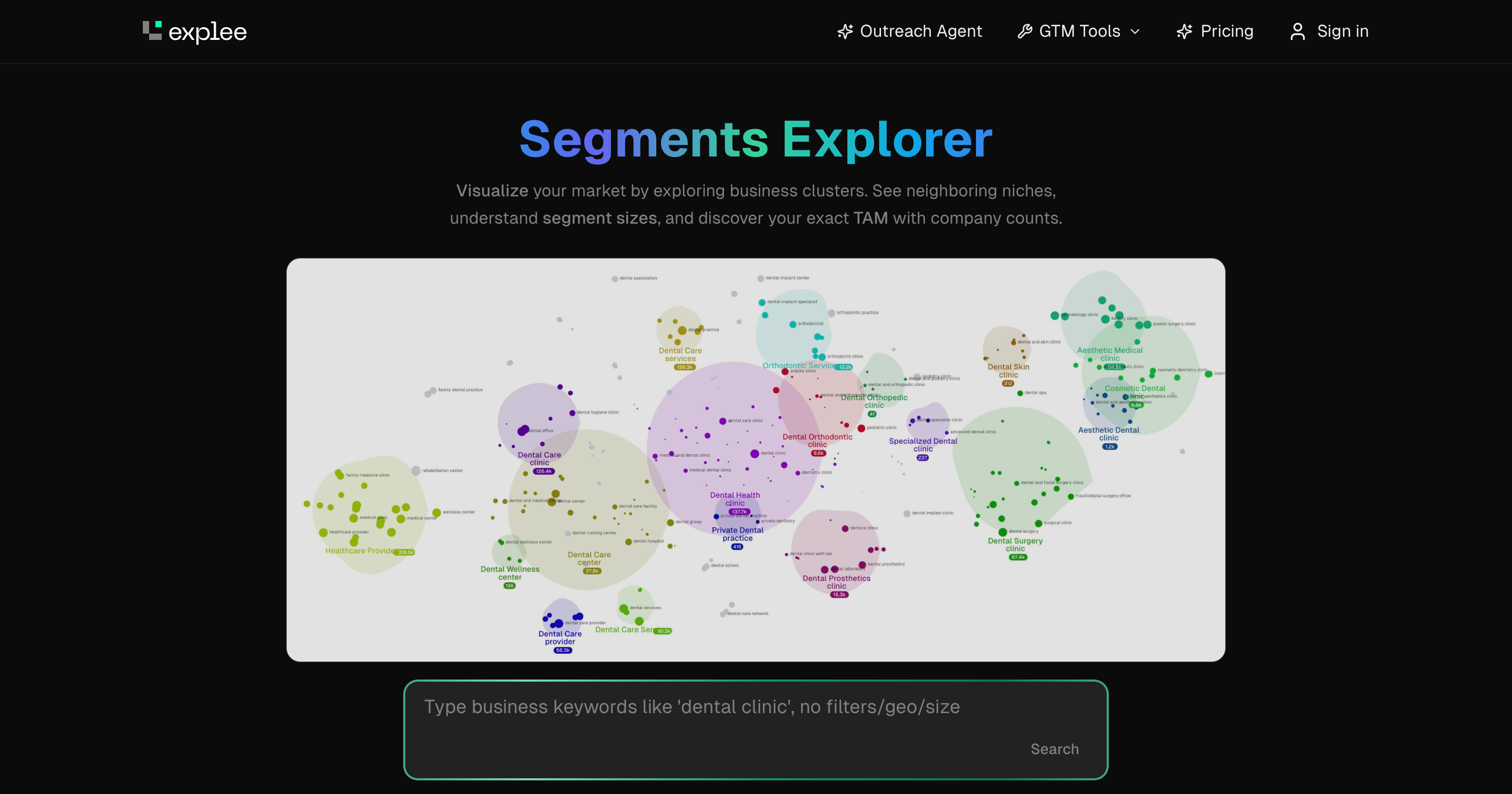
| A map of business niches with company counts, to size your market | Free |
Segments Explorer is worth a look even if you never use the agent. Type a niche like "dental clinic" and it draws the neighboring segments with the number of companies in each.
When to use it
Explee vs other outreach tools
| | Explee | Instantly | Apollo | Clay |
|---|---|---|---|---|
| Who finds leads | The agent, from your website | You, with its lead database | You, with 65+ filters | You, with 100+ data providers |
| Who writes emails | The agent, per lead | You, with AI help | You, with AI help | AI columns you set up |
| Who sends | Explee's pre-warmed mailboxes | Your inboxes, warmed by Instantly | Your inbox | A connected sequencer |
| Who handles replies | The agent, up to a booked call | You, in a shared inbox | You | You |
| Price to start | $30 free, then $0.04 per email | From $37 a month | Free plan, then from $59 per user | Free plan, then from $149 a month |
Who builds it
Explee's 3 co-founders all held senior roles at Skyeng and Skypro, online education companies. Alex Kataev (CEO) led engineering at Skyeng for 8 years and founded Eightify. Khariton Matveev (CTO) was Skyeng's CPO. Vladimir Baiandin (CRO) was CEO at Skypro. The team says all of its code is written by AI and it deploys about 60 times a day, so expect the product to change quickly.


