
T3 Code is a free, open-source app that puts all your coding agents in one window. You keep paying for Claude Code, Codex or Cursor as before; T3 Code is the interface on top: parallel threads, approvals, a diff viewer, a terminal and one button to open a pull request. It runs on macOS, Windows, Linux, the web, iOS and Android, and the phone apps can drive agents on your computer from anywhere.
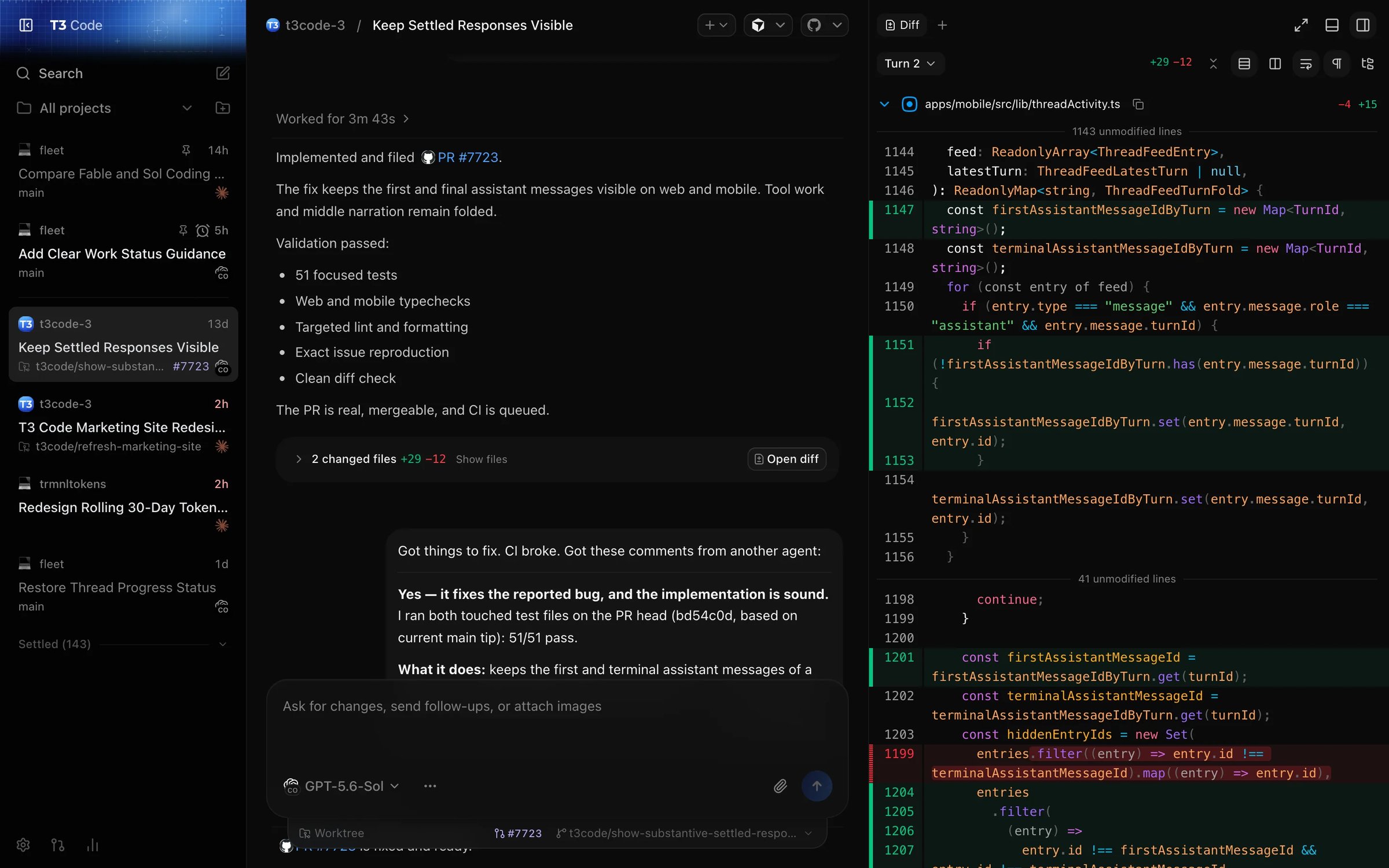
It's built by Theo Browne (t3.gg) and Julius at T3 Tools, launched in early 2026, and is MIT licensed. The GitHub repo, pingdotgg/t3code , has passed 26k stars. Better Stack's walkthrough is a good 10 minute overview:
What T3 Code is, and what it isn't
T3 Code is not a model and not an agent. It doesn't have its own harness the way OpenCode does. It runs a small server on your computer that starts the official CLIs you already have installed and logged in, and gives them one UI. That has three consequences:
- You get the native harness each model was trained on: Claude Code for Claude, Codex CLI for GPT models.
- Tokens never go through T3 Code. No keys are resold, there are no quota caps, and there's nothing to pay T3 for.
- The work happens on your machine, with your repos, tools and credentials. The desktop app, the browser and the phone are only views of that server. If the machine is off, the agents stop.
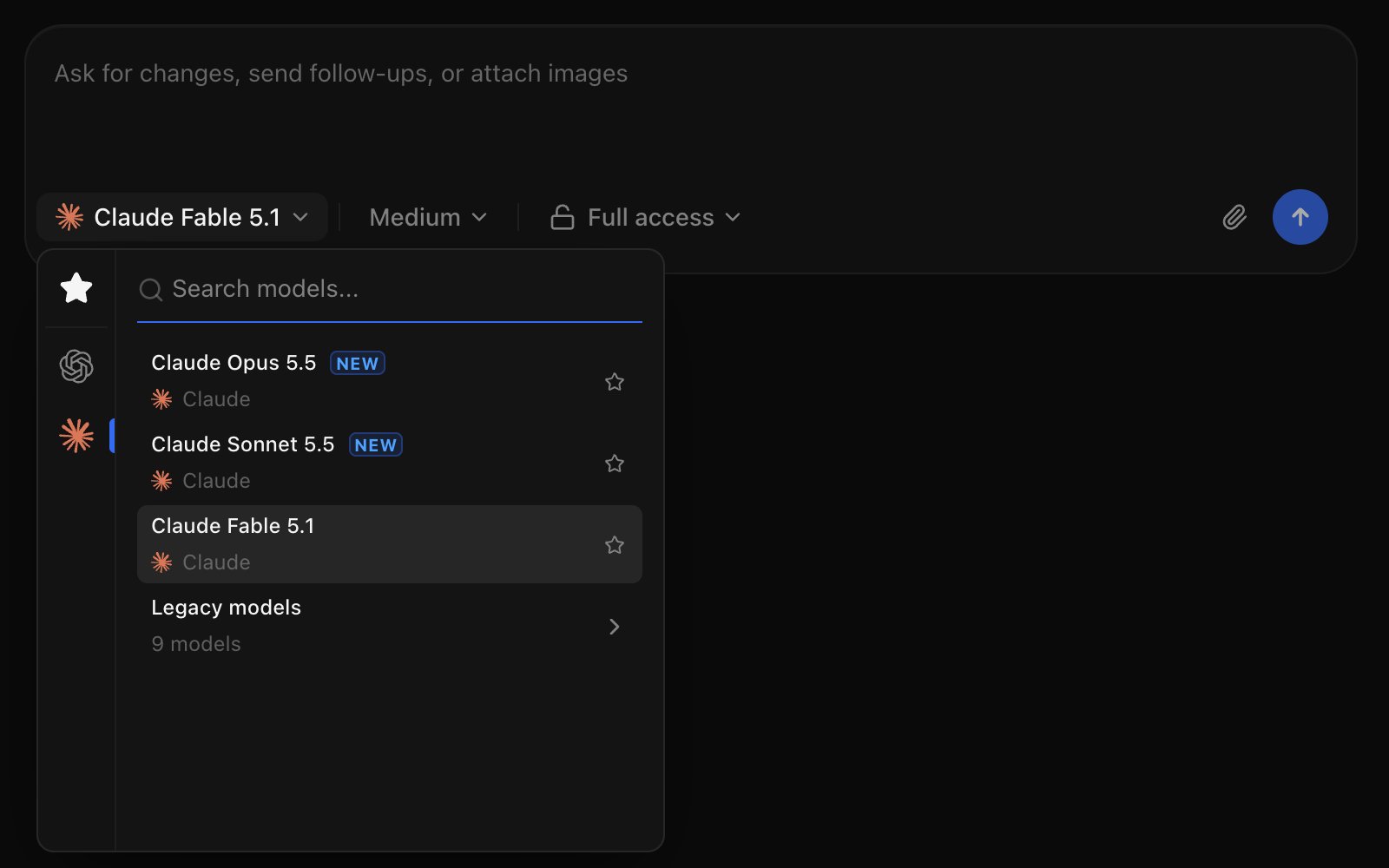
Supported agents today: Claude Code , Codex, Cursor, OpenCode, Grok Build and Google Antigravity. All models of all connected agents sit in one picker, so you can switch per thread.
Main features
Parallel threads in isolated worktrees
Each thread can get its own git worktree and branch, so 3 agents can work on 3 features in the same repo without stepping on each other. When a worktree is overkill, the thread works on your local checkout instead. The sidebar shows every thread across projects with its status: working, waiting for approval, waiting for your input, or done.
Permission modes and approvals
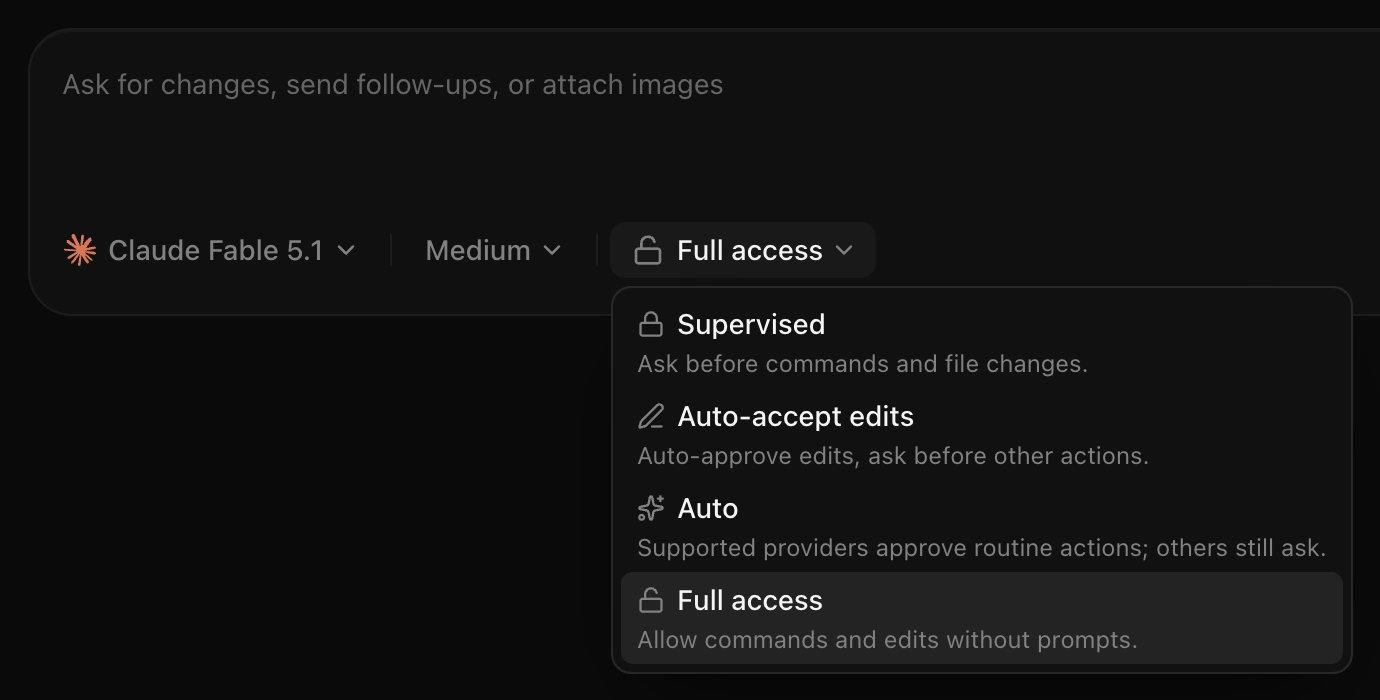
Every thread has a permission mode, picked right in the composer:
- Supervised : the agent asks before commands and file changes.
- Auto-accept edits : file edits go through, other actions still ask.
- Auto : the agent's own reviewer approves routine actions and asks about risky ones. Works on Codex, Claude, Cursor and Grok; other agents fall back to asking.
- Full access : no prompts. This is the default for new threads, so switch it in settings if you want the agent to ask first.
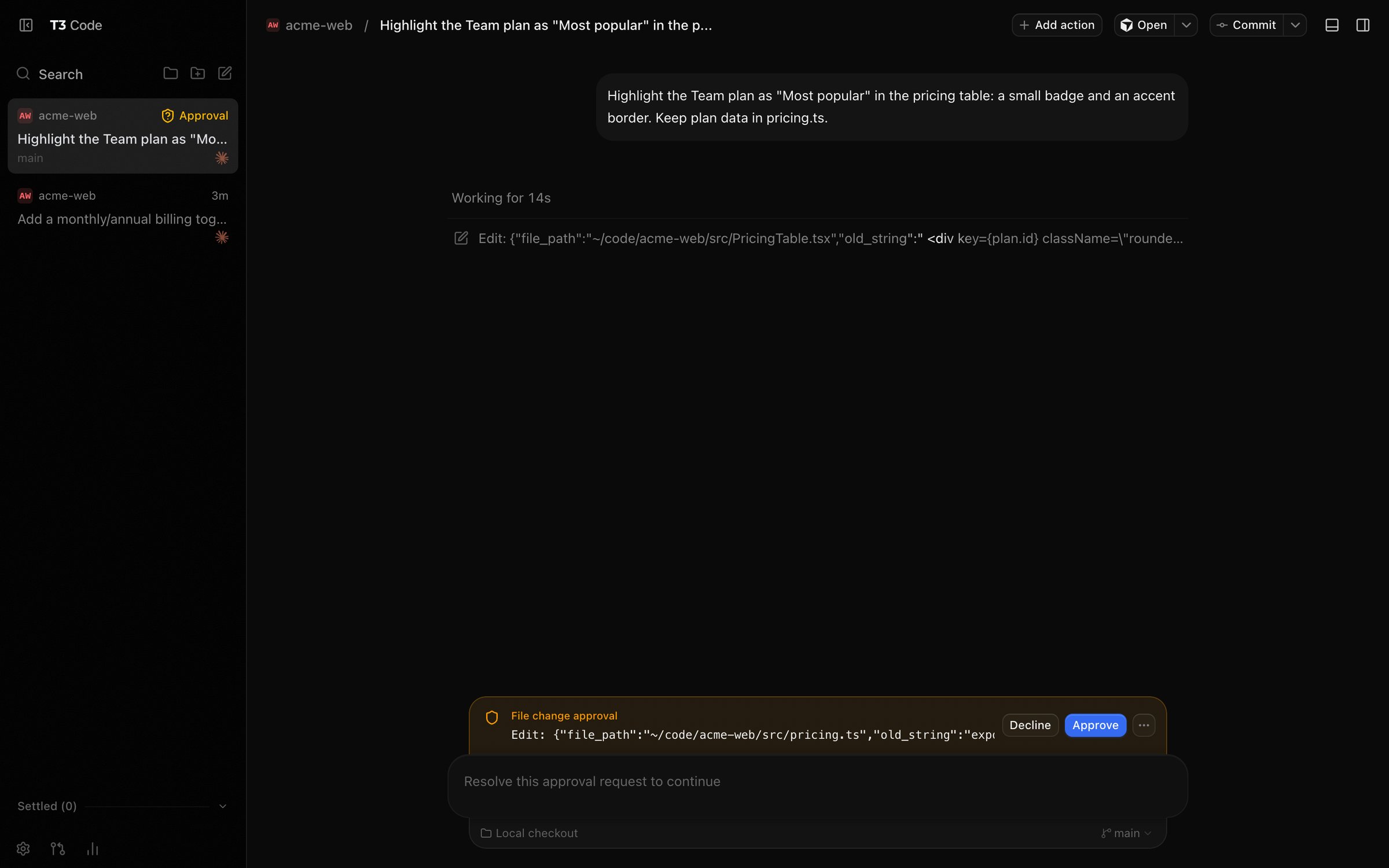
When the agent needs permission, the request shows up inline with Approve and Decline, and the thread gets an "Approval" badge in the sidebar. The same request reaches the phone app, so you can approve from anywhere.
Review every turn, revert any message
T3 Code saves a checkpoint around each turn, so the diff panel can show exactly what the latest turn changed, not just everything uncommitted. You can switch to the whole branch or to unstaged changes. If a turn went wrong, revert the conversation to before that message and choose whether to restore the files too.
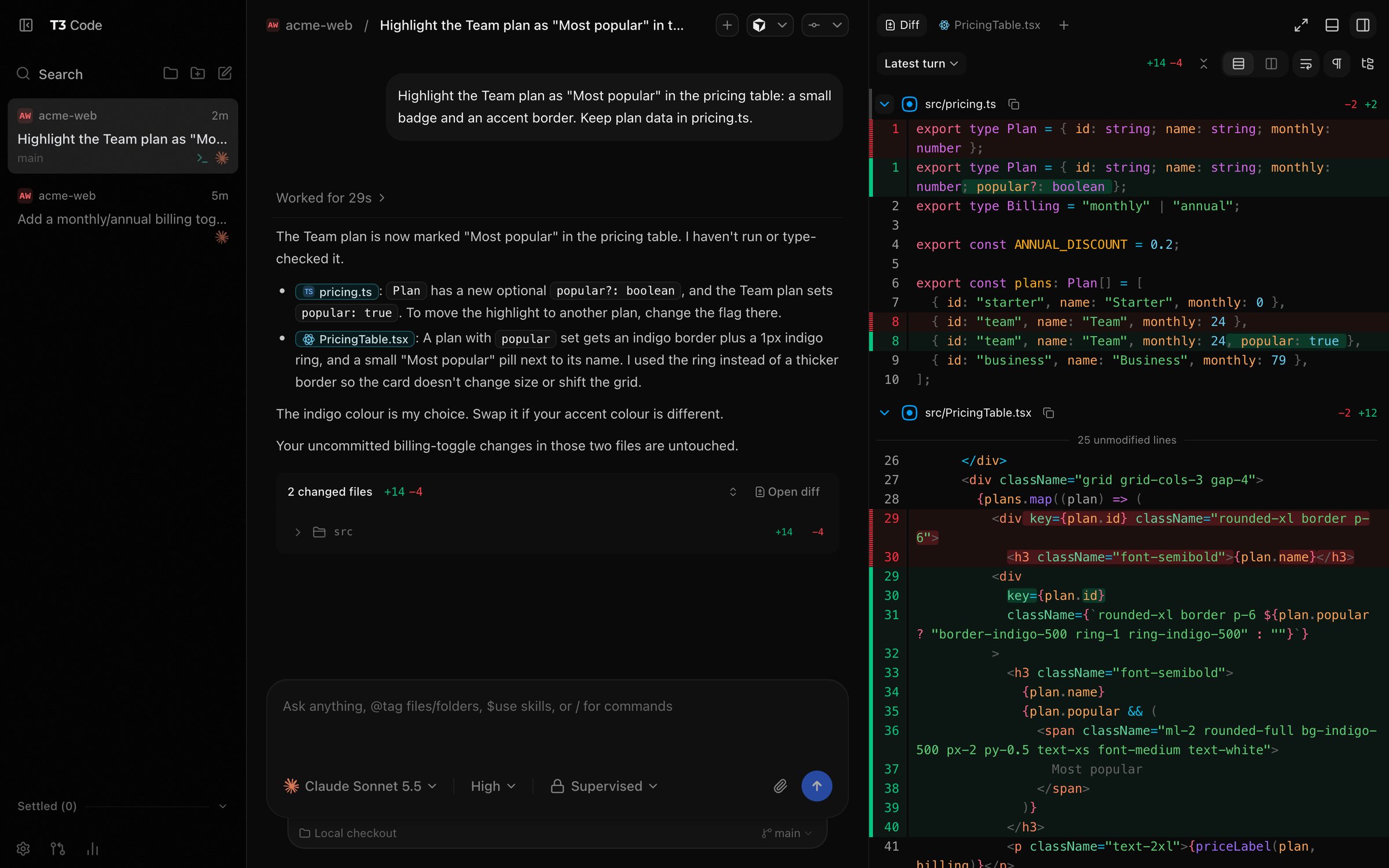
Next to the diff there's a file browser with an editor, a terminal per thread, and a browser panel for previewing the app the agent is running. Agents can use the same browser tabs, and iOS developers get a live Simulator or Android Emulator panel that the agent can tap through.
Commit, push and open a PR
One button commits, pushes and opens a pull request with a generated description. It works with GitHub, GitLab, Bitbucket, Azure DevOps, Forgejo and Gitea. A Pull requests view shows changes and comments, lets you request reviewers and check out a branch, so you can follow review without leaving the app.
Switch agents mid-thread
You can move a thread from one agent to another, for example plan with Claude and let Codex do the edits. T3 Code hands the conversation over: short threads go across in full, long ones keep the original request, the latest messages and the command results.
Usage and limits
The Usage page reads the history of all your agents and shows tokens, cache savings, a breakdown by model and an estimated API-equivalent cost. The Limits tab shows how much of your subscription's session and weekly limits is left. The cost figures are estimates at API prices, not your actual bill.
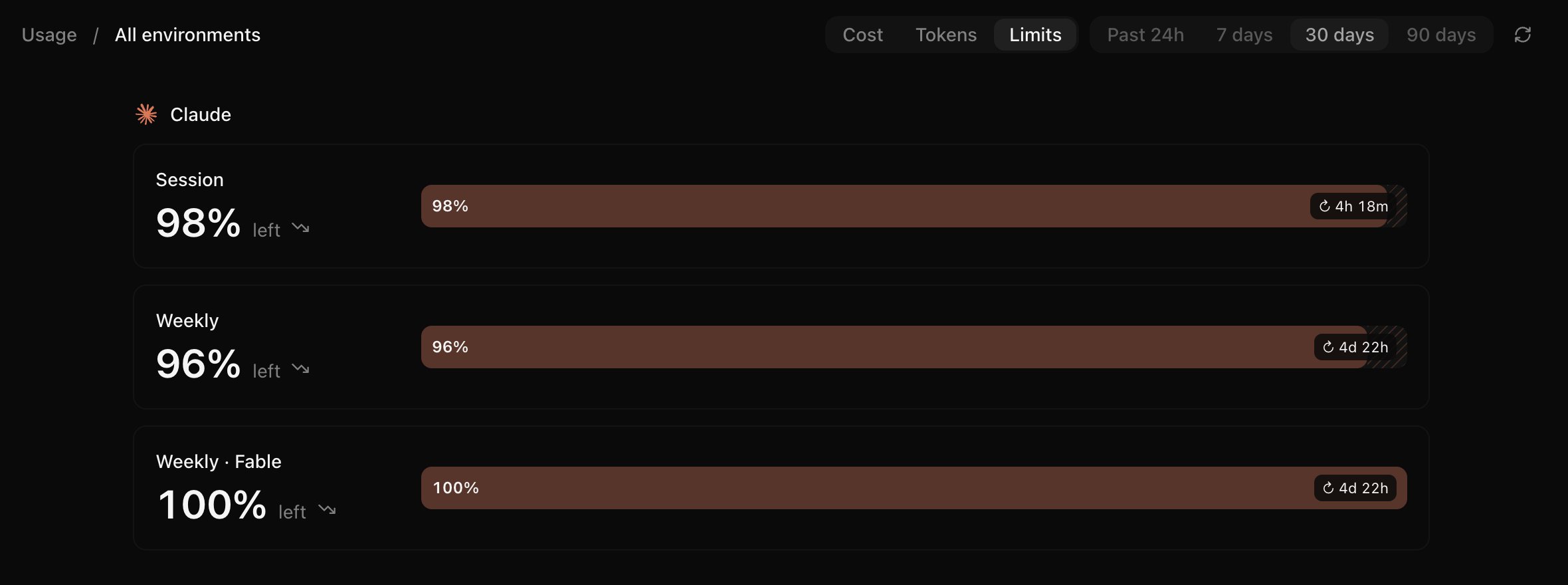
Remote access: run agents at home, steer them from your phone
This is the feature that made T3 Code popular. Your laptop or a home server does the work; you start threads, answer questions, approve commands and merge PRs from the phone. The agents keep running while you're away from the desk, and the code never leaves your machine.
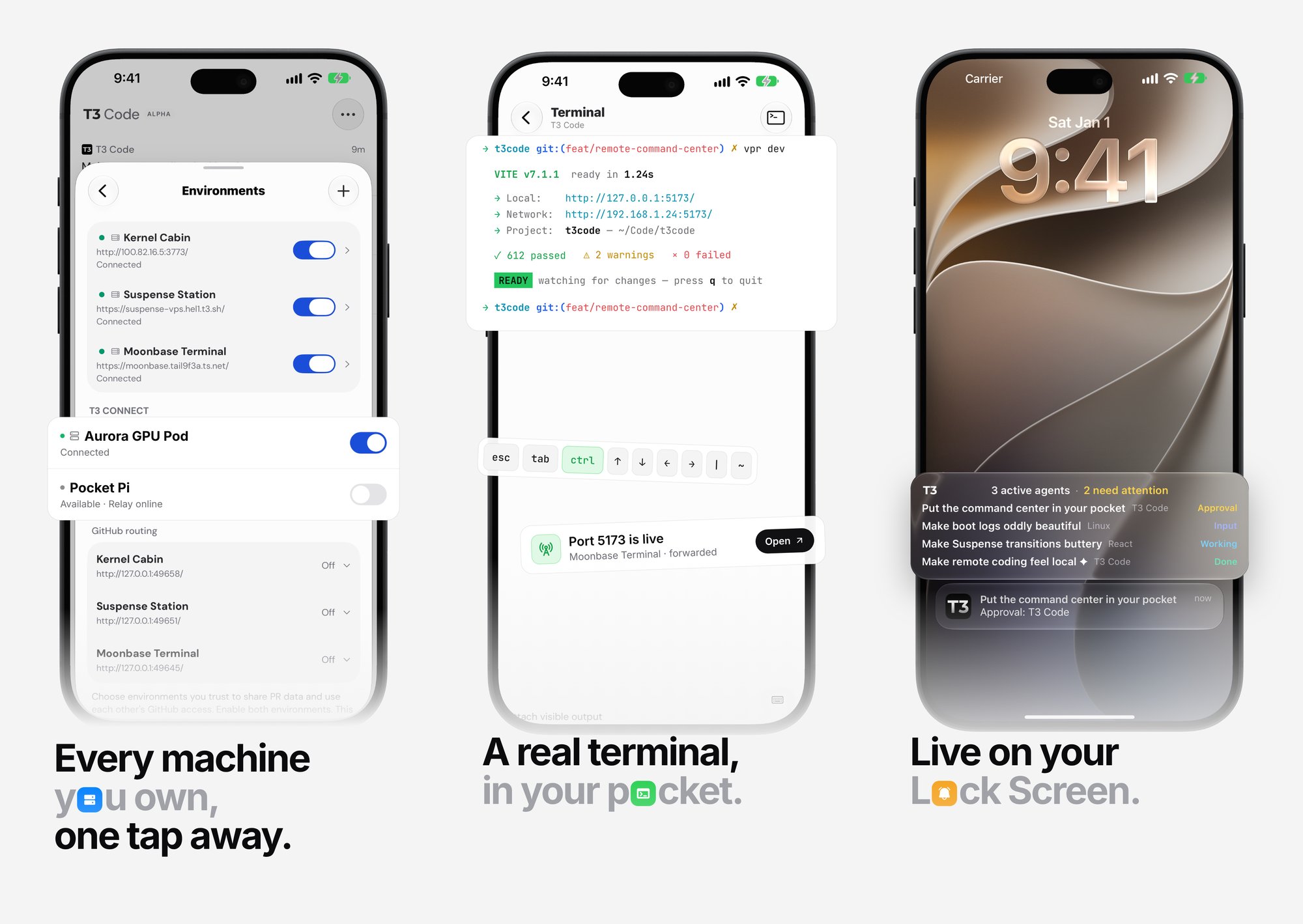
4 ways to connect to your machine
| Route | How | Best for |
|---|---|---|
| T3 Connect | Sign in on the host ( t3 connect) and on the phone, pick the machine. No router setup | Easiest, and it enables push notifications |
| LAN pairing | Turn on Network access , scan the QR code or paste the pairing link | At home, on the same Wi-Fi |
| Tailscale HTTPS | t3 serve --tailscale-serve, then t3 pair --tailscale | Your own private network, no third party in the path |
| SSH | In the desktop app: Add environment → SSH , enter user@host | Repos that already live on a Linux server or a Mac mini |
One machine can have several routes, and T3 Code uses the fastest one that answers: the LAN at home, T3 Connect or Tailscale when you're out. After you pair once through T3 Connect, it learns the machine's LAN and Tailscale addresses on its own. In a browser, app.t3.codes connects to the same machines, as long as they have an HTTPS address.
What you can do from the phone
The iOS and Android apps aren't a read-only dashboard. You get the full loop:
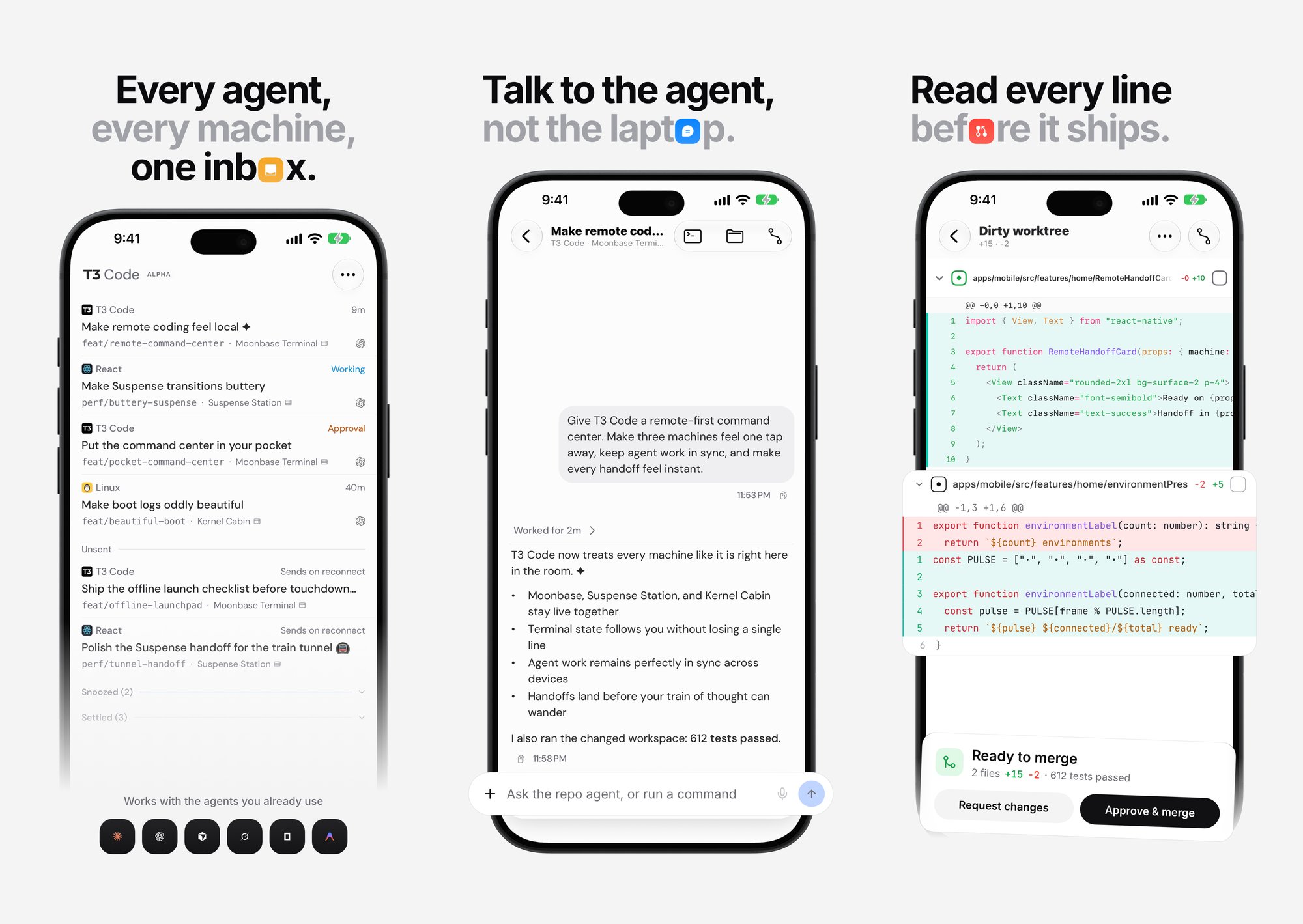
- One inbox of threads across all your machines, with what needs you at the top
- Chat with the agent and attach images
- Review the diff and approve or merge
- A real terminal on the remote machine, with port forwarding for previewing a dev server
- Push notifications when an agent finishes, fails or needs approval, and Live Activities on the lock screen (iOS) or ongoing notifications (Android)
Keep the machine available
For the phone to be useful, the server has to keep running when you close the terminal. On macOS and Linux,
t3 service install sets it up as a background service, and t3 update keeps it current. With 2 or more machines connected, T3 Code can spread new threads across them by free CPU and memory. A laptop can also run in remote-only mode: no local agents, it just drives the machines elsewhere.Other agents can use your machine too. Each environment has an MCP endpoint, so Claude Code in your terminal, ChatGPT or a bot can start and message T3 Code threads after you approve them.
Security
A pairing link is a password: whoever opens it can run commands on your machine. Each new device needs a fresh one-time link, and you can revoke a device or limit what a link allows (read only, no file writes, no git pushes) in Settings → Connections . T3 Connect relays only the connection setup; after that, traffic goes straight to your machine through a Cloudflare tunnel. If you'd rather keep a managed service out of the path entirely, use LAN, Tailscale or SSH.
How to set it up
- Install and log into at least one agent CLI:
claude,codex,cursor-agent,opencodeor Grok's CLI. For Codex, T3 Code can also sign you in with your ChatGPT account.
- Install T3 Code:
- Try it without installing (Node 22.16+):
npx t3@latest
- Install script:
curl -fsSL https://t3.codes/install.sh | sh
- Desktop app: download from t3.codes , or
brew install --cask t3-codeon macOS,winget install T3Tools.T3Codeon Windows,yay -S t3code-binon Arch
- A setup wizard walks through 3 steps: pick the computers to use, check which agents are ready, and import your projects. It finds the projects and past conversations of the agents you already use, so you can bring them over in one click.
- Set the default permission mode in Settings → General before the first real task.
- For the phone: install the iOS or Android app and connect through one of the routes above.
Where it falls short
T3 Code is still alpha, at version 0.0.45 stable with daily nightlies, and the README says to expect bugs. Settings move between releases, and server and phone app need compatible versions.
Each agent still has its own install, login and update cycle, and you manage all of them. Usage numbers are estimates read from local history, not your bill, and they're only as complete as that history. Remote access only works while the host is on and reachable, so a laptop that sleeps in a bag isn't a server. And a permission mode is not a sandbox: in Full access, the agent can do anything your user account can.
T3 Code alternatives: Conductor, Superset, Herdr and official apps
Conductor has the more polished UX but is closed source and built around Claude Code first. The official Claude Code and Codex desktop apps go deepest on their own models but lock you into one provider. Superset is the closest open-source alternative, with a built-in browser and terminal. T3 Code's edge is the combination: open source, every major agent, and real mobile apps that drive your own machine. If you'd rather stay in the terminal, Herdr runs the same agents in real terminal panes and keeps them alive over SSH. For a side-by-side of all of them, see Top new agentic IDEs .


Ship faster than your competition
Focus on customers and sales while we handle product delivery. Hire a dedicated AI maker or a whole product team.
Launch new products
Fix your delivery
Hit fundraising milestones


'%3e%3cpath%20fill-rule='evenodd'%20clip-rule='evenodd'%20d='M2500%201250C2500%201940.36%201940.36%202500%201250%202500C559.644%202500%200%201940.36%200%201250C0%20559.644%20559.644%200%201250%200C1940.36%200%202500%20559.644%202500%201250ZM1030.7%20697.9C986.2%20688.4%20937%20683.6%20883.1%20683.6H350V1816.5H899.1C949.1%201816.6%20999%201810.2%201047.4%201797.5C1095.5%201784.8%201138.3%201765.3%201175.9%201738.8C1213.5%201712.4%201243.4%201678.3%201265.6%201636.5C1287.8%201594.7%201298.9%201545.2%201298.9%201488.1C1298.9%201417.2%201281.7%201356.6%201247.3%201306.4C1212.9%201256.2%201160.8%201221%201091%201200.9C1141.7%201176.6%201180.1%201145.4%201206%201107.3C1231.9%201069.2%201244.9%201021.6%201244.9%20964.5C1244.9%20911.6%201236.2%20867.2%201218.7%20831.2C1201.2%20795.2%201176.6%20766.4%201144.9%20744.7C1113.2%20723%201075.2%20707.4%201030.7%20697.9ZM960.9%201110.4C932.3%201131.5%20895.8%201142.1%20851.4%201142.1L599.2%201142.3V877.3H832.3C853.9%20877.2%20875.4%20879.1%20896.6%20882.8C917.2%20886.5%20935.4%20893.1%20951.3%20902.6C967.2%20912.1%20979.9%20925.4%20989.4%20942.3C998.9%20959.2%201003.7%20980.9%201003.7%201007.3C1003.8%201054.9%20989.5%201089.2%20960.9%201110.4ZM935.5%201615.7C912.6%201620.5%20889.2%201622.9%20865.7%201622.8L599.2%201622.9V1311.9H870.5C924.4%201311.9%20967.8%201324.3%201000.6%201349.2C1033.4%201374%201049.8%201415.6%201049.8%201473.7C1049.8%201503.3%201044.7%201527.7%201034.7%201546.7C1024.6%201565.7%201011.1%201580.8%20994.2%201591.9C977.3%201603%20957.7%201610.9%20935.5%201615.7ZM1758.3%201648.2C1694.8%201648.2%201646.1%201631.8%201612.3%201599C1578.5%201566.3%201560%201513.4%201556.9%201440.7H2148.7C2152.9%201377.2%202147.6%201316.4%202132.8%201258.2C2118%201200%202093.9%201148.2%202060.6%201102.7C2027.3%201057.2%201984.7%201021%201932.9%20994C1881%20967%201820.2%20953.5%201750.4%20953.5C1688%20953.5%201631.1%20964.6%201579.8%20986.8C1528.5%201009%201484.3%201039.4%201447.3%201078C1410.3%201116.6%201381.7%201162.3%201361.6%201215.2C1341.5%201268.1%201331.5%201325.2%201331.5%201386.5C1331.5%201449.9%201341.3%201508.1%201360.8%201561C1380.3%201613.9%201408.1%201659.3%201444.1%201697.4C1480.1%201735.5%201524%201764.9%201575.8%201785.5C1627.6%201806.1%201685.8%201816.4%201750.3%201816.4C1843.4%201816.4%201922.7%201795.2%201988.3%201752.9C2053.9%201710.6%202102.6%201640.3%202134.3%201541.9H1936C1928.6%201567.3%201908.5%201591.4%201875.7%201614.1C1842.9%201636.8%201803.8%201648.2%201758.3%201648.2ZM1744%201123.1C1799%201123.1%201840%201137.9%201867%201167.5C1893.9%201197.1%201912.7%201240.5%201923.4%201297.5H1556.9C1557.9%201281.7%201561.4%201263.7%201567.2%201243.6C1573%201223.5%201583%201204.5%201597.3%201186.5C1611.6%201168.5%201630.6%201153.5%201654.4%201141.3C1678.1%201129.2%201708%201123.1%201744%201123.1ZM1976.2%20741.1H1518.3V868.1H1976.2V741.1Z'%20fill='white'/%3e%3c/g%3e%3cdefs%3e%3cclipPath%20id='clip0_52_236'%3e%3crect%20width='2500'%20height='2500'%20fill='white'/%3e%3c/clipPath%3e%3c/defs%3e%3c/svg%3e)
'%3e%3cpath%20d='M444.031%20372.208C477.51%20456.911%20502.37%20544.115%20518.526%20633.203C541.573%20619.151%20563.115%20602.266%20582.693%20582.693C633.547%20531.833%20666.365%20467.75%20677.958%20398.198C628%20377.531%20573.286%20366.094%20515.948%20366.094C491.438%20366.094%20467.417%20368.208%20444.031%20372.208V372.208Z'%20fill='white'/%3e%3cpath%20d='M582.979%20100.266C582.88%20100.172%20582.786%20100.068%20582.693%2099.974C518.219%2035.5052%20432.505%20-7.62939e-06%20341.333%20-7.62939e-06C305.682%20-7.62939e-06%20270.865%205.45312%20237.828%2015.9219C290.781%2082.2656%20337.365%20153.068%20377.286%20227.896C452.495%20195.964%20521.771%20152.698%20582.979%20100.266Z'%20fill='white'/%3e%3cpath%20d='M609.797%20130.479C545.589%20185.63%20473.839%20230.323%20395.761%20263.724C407.271%20286.896%20418.141%20310.437%20428.401%20334.328C457.052%20328.875%20486.287%20326.094%20515.948%20326.094C573.401%20326.094%20629.282%20336.427%20682.308%20356.766C682.537%20351.641%20682.667%20346.5%20682.667%20341.339C682.667%20263.88%20657.032%20190.375%20609.797%20130.479V130.479Z'%20fill='white'/%3e%3cpath%20d='M131.234%20610.401C190.99%20657.255%20264.208%20682.667%20341.333%20682.667C390.354%20682.667%20437.792%20672.385%20481.203%20652.875C464.932%20558.594%20438.88%20467.625%20404.12%20381.047C283.323%20414.016%20183.802%20499.026%20131.234%20610.401V610.401Z'%20fill='white'/%3e%3cpath%20d='M334.88%20362.656C352.438%20355.229%20370.333%20348.938%20388.51%20343.76C378.917%20321.792%20368.74%20300.135%20358.031%20278.786C265.818%20313.026%20168.854%20330.375%2069.25%20330.375C46.1094%20330.375%2023.1198%20329.422%200.296875%20327.557C0.114583%20332.135%200%20336.729%200%20341.339C0%20432.51%2035.5052%20518.224%2099.974%20582.693C99.9948%20582.714%20100.021%20582.734%20100.042%20582.755C122.339%20538.286%20151.5%20497.87%20187.031%20462.333C229.745%20419.625%20279.484%20386.089%20334.88%20362.656Z'%20fill='white'/%3e%3cpath%20d='M339.323%20242.859C298.818%20167.844%20251.427%2097.0677%20198.016%2031.3698C162.021%2048.0417%20128.859%2071.0885%2099.974%2099.974C48.3281%20151.62%2015.2917%20216.906%204.1875%20287.708C25.6458%20289.464%2047.3438%20290.375%2069.25%20290.375C164.052%20290.375%20255.016%20273.594%20339.323%20242.859Z'%20fill='white'/%3e%3c/g%3e%3cdefs%3e%3cclipPath%20id='clip0_107_362'%3e%3crect%20width='682.667'%20height='682.667'%20fill='white'/%3e%3c/clipPath%3e%3c/defs%3e%3c/svg%3e)